











How to Fix a Laptop That Overheats in Dubai: Causes, Quick Fixes and When to Get Help
Short answer: most overheating laptops in Dubai can be fixed in a few minutes. Move the laptop to a hard flat surface, clean the dust out of the vents, close the apps you do not need, and keep the laptop out of direct sun and hot cars. If the fan is still loud after that, or the laptop shuts down on its own, the problem is inside the laptop, usually dried thermal paste, a weak fan, or a swollen battery, and it needs a repair. This guide shows you how to tell the difference, what to do first, and which laptops handle Dubai heat best.
A laptop that gets hot is not just uncomfortable on your lap. Heat is the one thing that shortens a laptop life more than anything else. A hot laptop slows down, the fan gets loud, the battery wears out fast, and in the worst case the laptop shuts down in the middle of your work. In Dubai the problem is worse than in most places, because the air outside is hot for most of the year, and a laptop has to work harder to cool itself when the air around it is already warm.
The good news is that most overheating has a simple cause. A blocked vent, a bed blocking the air flow, dust inside the fan, or ten heavy apps running at once. Fix the cause and the laptop cools down. This guide walks through each cause in plain words, so you can fix it yourself when you can, and know when to bring the laptop in for a free diagnosis instead.
Why laptops overheat in Dubai
A laptop makes its own heat every time it works. The processor and the graphics chip get hot, and the fan pushes that heat out through the vents. In a cool room this works well. In Dubai it is harder, because the air the fan pulls in is already warm, so the laptop has to work harder to push the same heat out.
Three things make it worse here. First, the summer heat. A room without air conditioning, a desk near a sunny window, or a car parked in the sun can push a laptop past its safe temperature in minutes. Second, dust. Dubai is a dusty city, and fine dust gets into the vents and builds up on the fan over months. A dusty fan moves less air, so the laptop gets hotter even when you do nothing different. Third, how people use laptops at home. A laptop on a bed, a cushion, or a sofa blocks the vents underneath, so the hot air has nowhere to go. The fan spins faster, the laptop gets hotter, and the parts wear out sooner.
None of this means your laptop is broken. It means the cooling has a problem, and most cooling problems are cheap to fix when they are caught early.
Signs your laptop is overheating
Your laptop will tell you it is too hot, if you know what to look for. Here are the signs, from the mild ones to the serious ones.
| Sign | What it means | How urgent |
|---|---|---|
| Fan is loud all the time | The fan is working hard to push heat out | Mild, but check the vents |
| Keyboard and base feel hot | Heat is building up inside, not escaping | Mild to medium, move it to a hard surface |
| Laptop slows down suddenly | The processor is slowing itself down to cool off | Medium, close heavy apps and clean the vents |
| Apps freeze or crash | Heat is making the system unstable | Medium, get it checked soon |
| Laptop shuts down on its own | The laptop is protecting itself from heat damage | Serious, bring it in at once |
| Battery looks swollen | Heat has damaged the battery | Serious, stop using it and bring it in |
The slowdown deserves a special note. When a processor gets too hot, it slows itself down on purpose to cool off. This is called thermal throttling. Your laptop feels slow, videos stutter, and apps take ages to open, even though the laptop is not old and the processor is fast. Many people think they need a new laptop when this happens. In fact, they usually need a clean and a new layer of thermal paste, which costs far less than a new laptop.
Quick fixes you can do today
Try these in order. Most overheating laptops cool down after the first two or three steps.
Fix 1: use a hard flat surface
Put the laptop on a table or a desk, never on a bed, a cushion, or a sofa. A bed blocks the vents underneath, so the hot air has nowhere to go. A table lets the air flow. If you work from a sofa a lot, a cooling pad or a laptop stand lifts the laptop and lets air move underneath. This one change alone fixes a large share of overheating complaints we hear in our shop.
Fix 2: clean the dust out of the vents
Turn the laptop off. Look at the vents on the sides and underneath. If you can see dust, blow it out with a can of compressed air, in short bursts, from outside the vent. Do not use a vacuum cleaner, which can spin the fan too fast and damage it. Do not open the laptop yourself unless you know how, because one wrong move can break a cable inside. If the dust is deep inside, bring the laptop in. Our diagnosis is free, and a proper internal clean is a cheap job.
Fix 3: close the apps you do not need
Open Task Manager by pressing Ctrl, Shift and Escape together, and look at the CPU column. If one app is using most of the processor, close it or restart it. Chrome with thirty tabs open, Zoom, Teams, and video editing apps all make a laptop hot. You do not need to close everything. Just close what you are not using right now. On a laptop with 8GB of RAM, too many apps at once will also make the fan work harder, so keep your open apps to what you really need.
Fix 4: keep the laptop out of sun and hot cars
Never leave a laptop in a parked car. A car in the Dubai sun can reach temperatures that damage a battery and warp plastic in less than an hour. If you must carry the laptop in a car, keep it in the cabin with the air on, never in the boot. At home or in the office, keep the laptop out of direct sun. A desk near a sunny window can heat the laptop all afternoon, even with the air conditioning on.
Fix 5: update Windows and your drivers
Old drivers can make the fan run badly, and old Windows can run background jobs that heat the laptop for no reason. Go to Settings, then Windows Update, and install the updates. Then check the laptop maker website for the latest drivers for your model. Restart the laptop at least once a week, so updates can finish and background jobs can clear. A laptop that never restarts will get slow and hot over time.
Fix 6: change the power settings
On Windows, go to Settings, then System, then Power. If the power mode is set to Best Performance all the time, the processor runs at full speed even when you only browse the web, and it gets hot for no reason. Set it to Balanced for daily work. Save Best Performance for video editing, gaming, or heavy work, and switch back when you are done. This one setting can drop the temperature by several degrees.
Quick checklist before you pay for a repair: laptop is on a hard flat surface, vents are clean and not blocked, only the apps you need are open, the laptop is out of direct sun, Windows and drivers are updated, and the power mode is Balanced. If the fan is still loud or the laptop still shuts down after all six, the problem is inside the laptop, and it needs a repair.
Do cooling pads really help
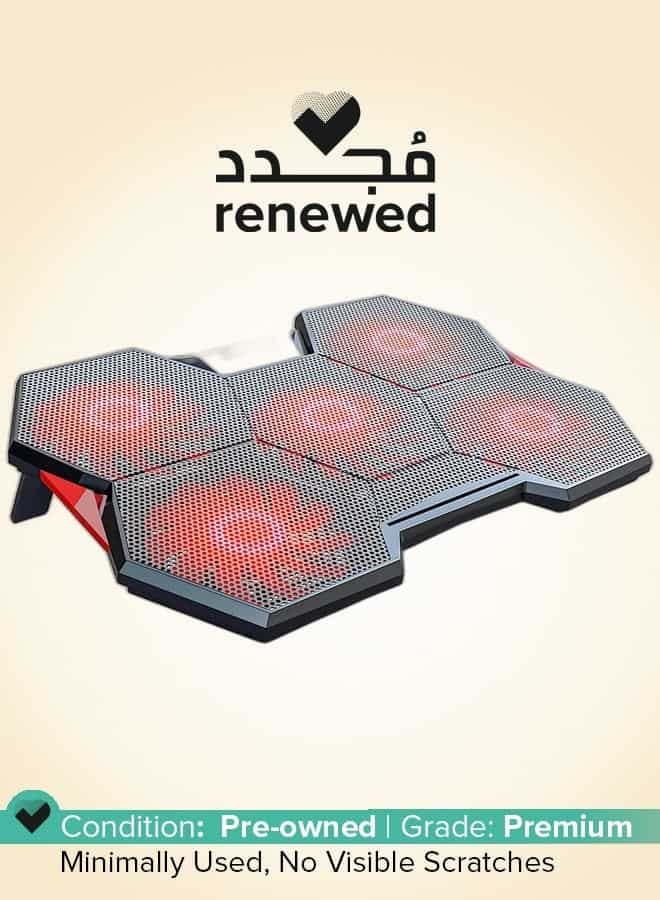
Yes, a cooling pad helps, and it helps most in two cases. First, if you use the laptop on a soft surface like a bed or a sofa, a cooling pad lifts it and lets air flow underneath. Second, if you run heavy apps for hours, like video editing, gaming, or large Excel files, the extra fans push more cool air into the laptop.
Our 5-Fan Laptop Cooling Pad at AED 79 has five fans and several height settings, so you can type at a comfortable angle while the fans move air under the laptop. The Promate AirBase-2 at AED 149 is the bigger option, with a stronger build for a desk setup. Both plug into a USB port, so they need no extra power socket.
A cooling pad is not a fix for a broken fan or dried thermal paste. If the laptop overheats on a desk with clean vents, a cooling pad will help a little, but it will not fix the real problem. Think of it as help for a healthy laptop, not medicine for a sick one.
When the problem is inside the laptop
If the quick fixes do not work, the cause is usually one of four things inside the laptop. All four are common, all four are fixable, and none of them means you need a new laptop.
Dried thermal paste. Between the processor and the cooling fan sits a thin layer of paste that moves heat from the chip to the fan. After three or four years this paste dries out and stops working. The processor gets hot, the fan spins loud, and the laptop slows down. A new layer of paste is a cheap repair, and it often makes an old laptop feel new again. This is the most common fix we do for overheating laptops in our shop.
A weak or dead fan. Fans wear out. A fan that rattles, grinds, or spins slowly cannot push enough air. If you hear a new noise from the fan, or the fan never seems to start, the fan may need to be replaced. A fan replacement is a normal repair on a business laptop, and the parts are easy to get for Dell Latitude, HP EliteBook and Lenovo ThinkPad models.
Dust deep inside. The dust you can see in the vent is only part of it. Over years, dust builds up on the heatsink fins inside the laptop, where you cannot reach it from outside. The laptop needs to be opened and cleaned properly. We do this as part of our free diagnosis, and it is a cheap job.
A swollen battery. Heat damages batteries, and a damaged battery can swell. A swollen battery pushes against the keyboard and the trackpad, and it can make the laptop feel hot even when it is off. If your trackpad clicks oddly, or the bottom of the laptop does not sit flat on a table, stop using the laptop at once and bring it in. A swollen battery is a real problem, not a small one. Our diagnosis is free, and a swollen battery is covered under the 12 month warranty when it fails early on a laptop we sold.
What overheating does to your laptop over time
Heat does slow damage, even when the laptop still works. The battery loses capacity faster when it stays hot, so a laptop that runs hot will need a new battery sooner. The SSD wears out faster too, because heat makes the drive work harder. And the processor, when it slows itself down again and again to cool off, gives you less speed than you paid for.
This is why a cheap fix now is worth more than a new laptop later. A clean and a new layer of thermal paste costs little, and it can add years to a laptop. A laptop that is left to overheat for months will cost far more in the end, in a dead battery, a dead drive, or a dead board.
Storage matters here too. A laptop with a nearly full drive runs hotter, because Windows has no room to work. Keep at least 10% of the SSD free. If your drive is full, move photos and videos to a USB drive or to cloud storage. If you need more room, a bigger SSD is a cheap upgrade. Our WD Blue 500GB SSD at AED 169 gives you twice the room of a 256GB drive, and a 8GB DDR4 RAM upgrade at AED 118 takes the pressure off a laptop that runs too many apps at once.
Which refurbished laptops handle Dubai heat best
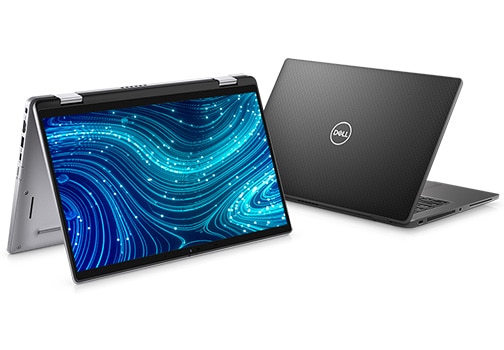
Some laptops handle heat better than others. Business laptops like the Dell Latitude, HP EliteBook and Lenovo ThinkPad were built for companies, so they have better cooling, stronger fans, and metal bodies that spread heat. Cheap home laptops have small fans and plastic bodies, so they get hotter faster.
| Laptop | Why it handles heat well | Price |
|---|---|---|
| Dell Latitude 5430 | 12th Gen chip, runs cool, 16GB RAM, 512GB SSD | AED 1,999 |
| Dell Latitude 7420 | Carbon fibre body, 11th Gen i7, good airflow | AED 1,539 |
| Lenovo ThinkPad T14 Gen 3 | 12th Gen chip, ThinkPad cooling, strong build | AED 2,329 |
| Dell Latitude 5420 | 11th Gen i5, 16GB RAM, our most popular laptop | AED 1,239 |
| Dell Latitude 5330 | 12th Gen chip, small body, runs cool for its size | AED 999 |
| Dell Latitude 7410 | 10th Gen i5, 16GB RAM, premium 7000 series cooling | AED 789 |
Newer processors help a lot. A 12th Gen chip does the same work as an 8th Gen chip while making less heat, so it stays cooler in a warm room. That is why the Latitude 5430 at AED 1,999 and the Latitude 5330 at AED 999 are good picks if your current laptop always runs hot. The Latitude 7420 at AED 1,539 is the premium pick, with a carbon fibre body that spreads heat well. And the Latitude 5420 at AED 1,239 is our most popular laptop for office work and study, with 16GB of RAM and a 512GB SSD.
Every refurbished laptop we sell passes our full inspection before delivery, and the cooling is part of that inspection. We check the fan, clean the vents, test the temperatures under load, and replace the thermal paste when it is dry. You get a 12 month warranty, 10 day returns, and free diagnosis if anything ever goes wrong. If you are not sure whether your current laptop is worth fixing, bring it in. We will tell you honestly whether a clean will fix it, or whether a newer laptop is the better spend.
Frequently asked questions
Is it normal for a laptop to get hot in Dubai?
Warm is normal. Hot to the touch, a fan that never stops, or a laptop that shuts down is not normal. Dubai heat makes cooling harder, but a healthy laptop with clean vents and a working fan should stay cool enough to use on your lap. If yours does not, something needs to be fixed.
Can I use my laptop on a bed if I have a cooling pad?
A cooling pad helps, but a bed is still the worst place for a laptop. The soft surface blocks the vents, and the pad cannot fix that fully. Use a table or a desk when you can. If you must work from a bed, put a hard board or a lap desk under the laptop, and use a cooling pad as well.
How often should a laptop be cleaned inside?
Once a year is enough for most people in Dubai, and twice a year if you use the laptop every day in a dusty place. A proper internal clean means opening the laptop, blowing the dust out of the heatsink, and checking the thermal paste. It is a cheap job, and it keeps the laptop cool and fast for years.
Should I buy a new laptop or fix my overheating one?
Fix it first, if the laptop is less than five years old and the screen, keyboard and battery are still good. A clean and new thermal paste often fixes overheating for a small cost. Buy a newer laptop if the processor is 6th or 7th Gen, because it will not run Windows 11, or if the repair costs more than half the price of a newer refurbished laptop. Our diagnosis is free, so bring the laptop in and we will tell you honestly which choice is better.
If your laptop runs hot, do not wait for it to shut down in the middle of your work. Try the six quick fixes above, and if the fan is still loud, bring the laptop to our Sharjah store for a free diagnosis. Every laptop we sell carries a 12 month warranty and 10 day returns, with free delivery and cash on delivery across Dubai and Sharjah. Message us on WhatsApp at +971 58 959 4156 and tell us your laptop model and what it does when it gets hot. We will tell you what it needs, and what it will cost, before we touch it.
Related reading: How to Choose a Refurbished Laptop in Dubai and our Windows 11 guide.